Booking.com Is Watching You — With Every Click
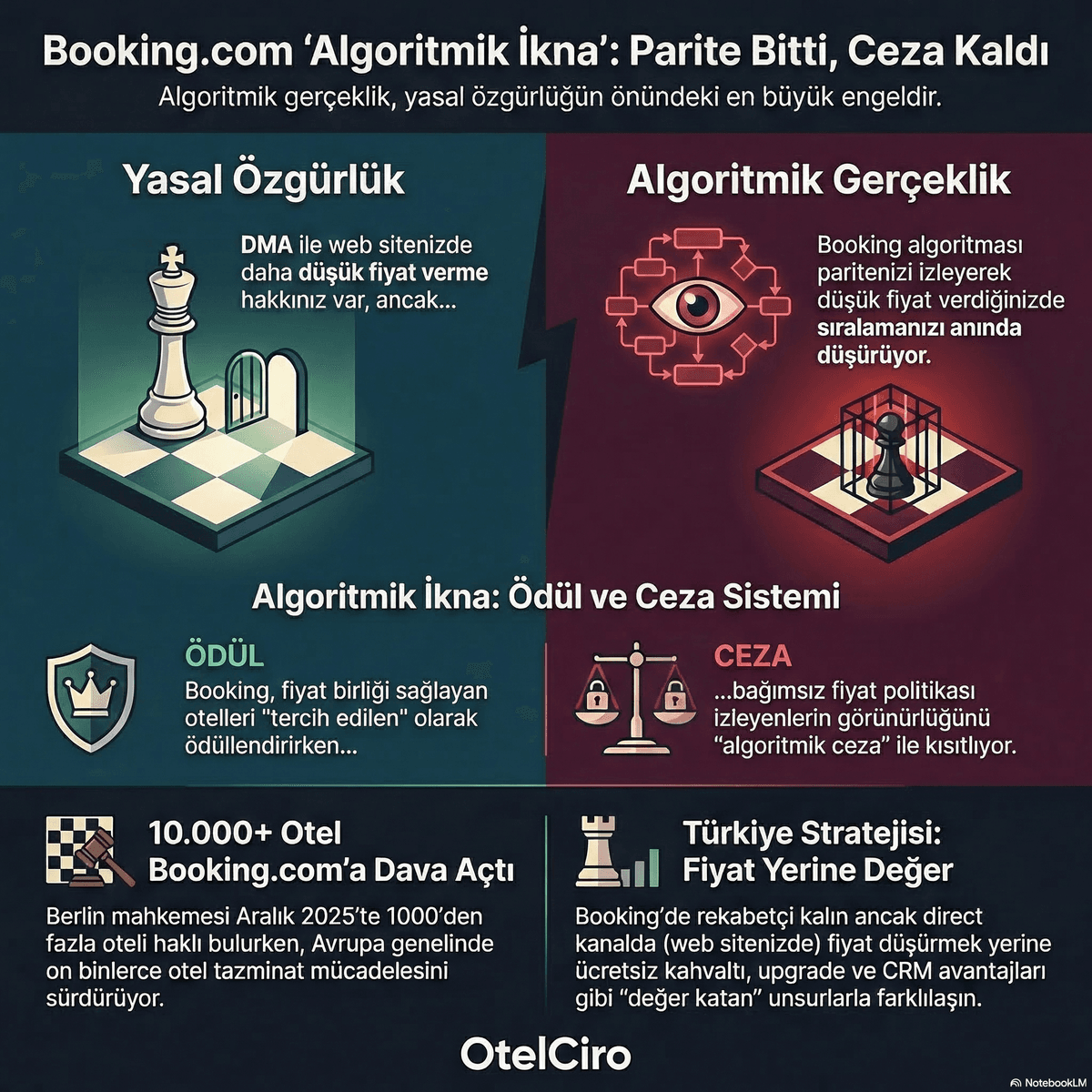
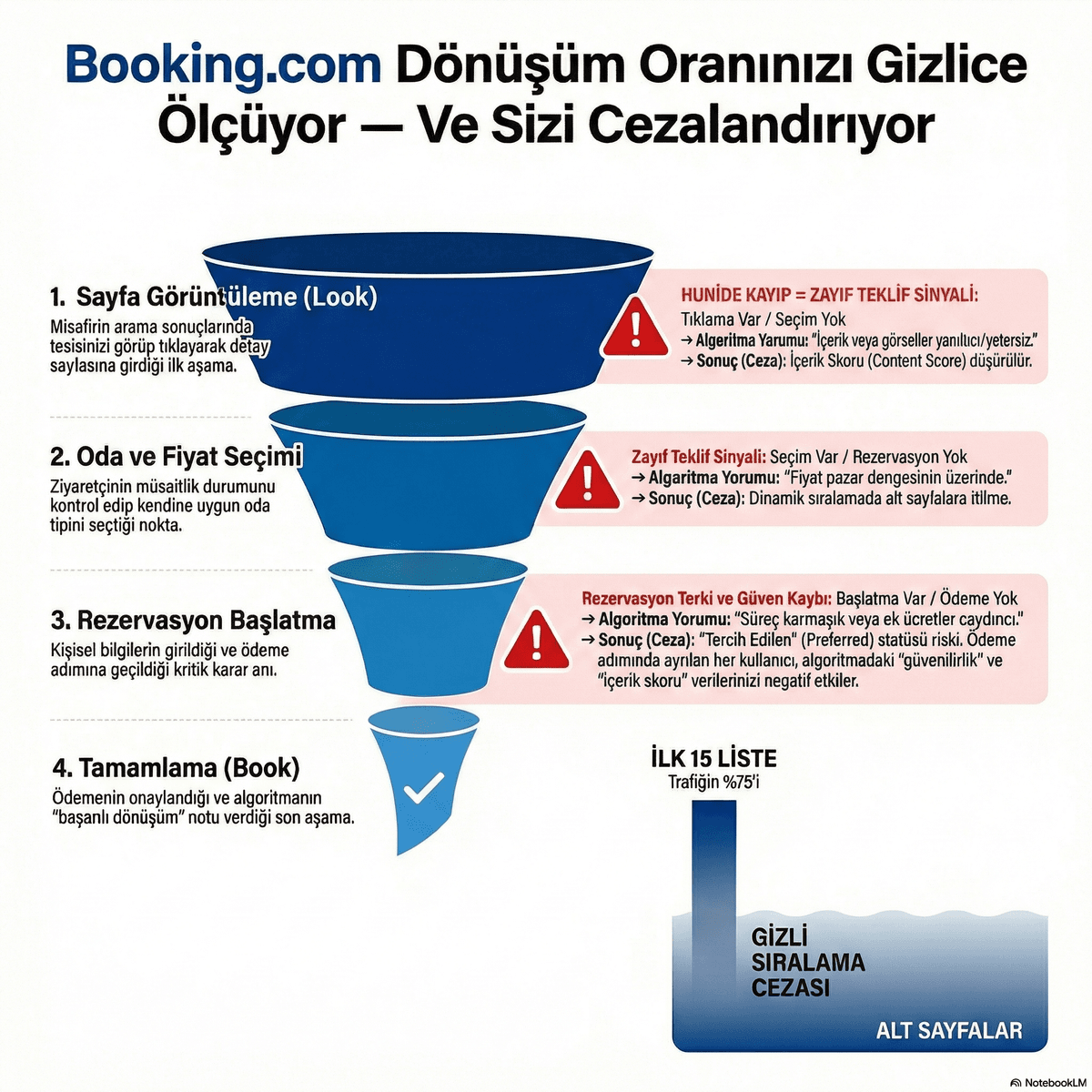
Booking.com tracks the behavior of every user who views your hotel page with millisecond precision. This data is not just for reporting — it directly feeds the ranking algorithm. If your conversion rate is low, Booking.com interprets this as "this hotel is presenting a weak offer" and lowers your ranking.
In this article, we will examine Booking.com's secretly measured 4-stage conversion funnel in detail and explain how drop-offs at each stage affect your ranking.
Related reading: 6 Critical Metrics You Must Track in Booking.com Extranet
The 4-Stage Conversion Funnel
Booking.com's conversion funnel consists of these steps:
Stage 1: Look (Impressions)
The user sees your hotel listing in search results. Metrics measured at this stage:
- Impression count: How many searches displayed your hotel?
- Click-through rate (CTR): What percentage clicked on your listing?
- Average position: Where do you rank in search results?
Common causes of drop-off at this stage:
- Low-quality main photo
- Uncompetitive price display
- Low review score (star rating)
- Inadequate listing description
Stage 2: Room Selection
The user has arrived at your hotel page and is reviewing room options. At this stage:
- Time on page: How long did the user spend on your page?
- Room selection rate: What percentage clicked on a room option?
- Photo engagement: How many photos were viewed?
Causes of drop-off:
- Insufficient room photos (especially missing bathroom photos)
- Confusing room type structure
- Missing amenity information (invisible in filters)
- Negative reviews
Stage 3: Booking Start
The user has selected a room and has begun filling out the reservation form:
- Form initiation rate: What percentage of room selectors started the form?
- Cancellation policy impact: Is a flexible cancellation option available?
Causes of drop-off:
- Offering only non-refundable options
- Hidden fees or extra taxes
- Limited payment options
Stage 4: Complete
The user completes the booking process:
- Completion rate: What percentage of form starters finished the booking?
- Payment success rate: What percentage of payment attempts succeeded?
Drop-offs at this final stage are typically caused by technical issues and are largely beyond the hotelier's direct control.
Embed this image on your site
<a href="https://otelciro.com/en/news/booking-donusum-hunisi">
  <img src="https://cdn.sanity.io/images/1la98t0z/production/4e1321089f9b1bc72258dde2b96e9760249756e6-1200x669.png" alt="Booking.com room type optimization" width="800" />
</a>
<p>Source: <a href="https://otelciro.com">OtelCiro</a> — AI Hotel Revenue Management</p>
Every Drop-Off = An Algorithm Signal
Here is the reality most hoteliers are unaware of: every drop-off at every funnel stage is a negative signal to the Booking.com algorithm. The algorithm collects these signals and uses them to determine your ranking.
Low conversion rate leads to a "weak offer" label, which triggers Content Score decline, which causes ranking loss, which means less traffic, which means fewer bookings, which produces an even lower conversion rate.
This vicious cycle, if left unaddressed, will bury your hotel deep in search results. Booking.com's hidden penalties explain different dimensions of this dynamic.
Related reading: Booking.com 2025 vs. 2026: 6 Rules Changed — Hotels Sticking to Old Strategies Are Losing
The Top 15 Rule: 75% Traffic Share
In Booking.com search results, hotels in the top 15 positions capture 75% of total traffic. Falling below position 15 is essentially digital invisibility.
Here is how the distribution breaks down:
| Ranking Range | Traffic Share | Conversion Impact |
|---|---|---|
| 1-5 | 40% | Highest conversion |
| 6-10 | 22% | High conversion |
| 11-15 | 13% | Moderate conversion |
| 16-25 | 12% | Low conversion |
| 25+ | 13% | Very low conversion |
Being in the top 5 means receiving 10x more traffic than being in position 25.
Embed this image on your site
<a href="https://otelciro.com/en/news/booking-donusum-hunisi">
  <img src="https://cdn.sanity.io/images/1la98t0z/production/035f1be486aeebcd0d836f5cf5613dac8e2510db-1200x669.png" alt="Booking.com commission management and optimization" width="800" />
</a>
<p>Source: <a href="https://otelciro.com">OtelCiro</a> — AI Hotel Revenue Management</p>
7 Ways to Improve Your Conversion Rate
1. Upgrade Photo Quality
Use professional, high-resolution photos. Always include bathroom photos. Review our OTA profile anatomy guide.
2. Offer a Flexible Cancellation Option
At least one flexible cancellation option must be available. A fully non-refundable-only approach reduces conversion by 15-20%.
3. Push Content Score to 100%
When your Booking.com Content Score reaches 100%, your conversion rate increases by 11%. Check for missing fields in Extranet.
4. Raise Your Review Score
Every +1 point increases RevPAR by 1.42%. Actively encourage satisfied guests to leave reviews.
5. Apply Competitive Pricing
Pricing significantly above your comp-set kills conversion. Adapt to market conditions with dynamic pricing.
6. Optimize the Mobile Experience
70% of Booking.com bookings come from mobile devices. Photos and descriptions that do not display well on mobile will reduce conversion.
7. Offer Room Variety
Provide room options that cater to different budgets and needs. Hotels with a single room type are at a disadvantage against competitors offering variety.
Related reading: Booking.com 2026: 7 Rules That Changed — If You Don't Know Them, You're Losing
Reading Your Conversion Data in Booking.com Extranet
In Extranet's "Analytics" section, you can see every stage of the conversion funnel:
- Impression to Click: Your listing CTR
- Click to Room Selection: Your page conversion rate
- Room Selection to Booking: Your checkout conversion rate
Track these metrics weekly. If you see a drop greater than 5% at any stage, intervene immediately.
Understanding how Booking.com's algorithm works will help you strategically address conversion funnel losses.
Frequently Asked Questions
Why did my conversion rate suddenly drop?
The most common reasons are: competitors lowering prices, new negative reviews, broken photos on the platform, or an OTA algorithm update. Use Extranet Analytics to identify which stage is losing and focus your efforts there.
How long does a conversion penalty last?
Conversion-driven ranking decline is immediate and continuous. When you make improvements, results typically begin to appear within 1-2 weeks. However, fully recovering your previous position can take 4-6 weeks.
Can I compare my conversion rate with competitors?
Booking.com Extranet provides limited access to comp-set conversion data. However, you can indirectly compare against competitors by tracking changes in your ranking position.
OtelCiro monitors every stage of the Booking.com conversion funnel in real time, identifies loss points, and delivers actionable recommendations. Discover OtelCiro to avoid ranking penalties.
![7 Advanced OTA Sales Tactics That Work [2026]](https://cdn.sanity.io/images/1la98t0z/production/0d8634b7f4d9033b08b65800012ec64261df48bc-1200x1200.png?w=1920&q=50&auto=format&fit=max)
![Booking.com Genius [2026]: Join, Leave or Optimize?](https://cdn.sanity.io/images/1la98t0z/production/fabaf8b8918404681f00de3f00e368aac91c9744-1200x1200.png?w=1920&q=50&auto=format&fit=max)