![Booking.com Mobile Rate: Boost 2026 Mobile Bookings [Strategy]](https://cdn.sanity.io/images/1la98t0z/production/a93f637c4d9972f5b62b7a277eb5e478bf4e90f0-1200x669.png?w=1920&q=65&auto=format&fit=max)
Key Takeaways
- Over 70% of Booking.com reservations are made on mobile devices, highlighting the critical need for a mobile-first strategy in 2026.
- Activating the Booking.com Mobile Rate feature can increase your hotel's mobile bookings by 14% by offering exclusive discounts to mobile app users.
- Mobile users exhibit distinct behaviors, including faster decision-making, shorter lead times (7-14 days), a tendency for shorter stays (1-2 nights), and higher price sensitivity.
- Strategic application is key: utilize Mobile Rate for specific scenarios like weekend gaps, last-minute availability, or during low seasons, but avoid its use during high-occupancy peaks.
- Optimize your mobile presence by ensuring photos are mobile-friendly, room names are concise, messages are promptly answered via the Pulse app, and easy check-in options are available.
Mobile-First World: Over 70% of Reservations Are Mobile
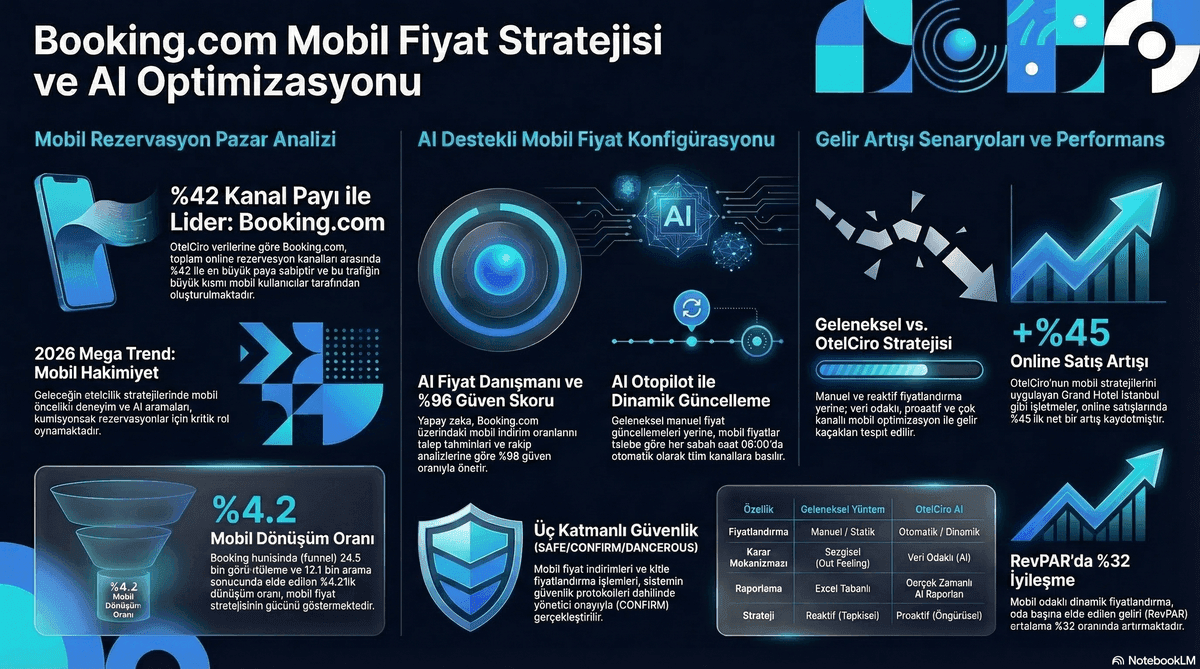
According to Booking.com's 2026 data, over 70% of all reservations are made via mobile devices. This rate continues to increase annually. The Booking.com Mobile Rate feature allows you to capture a larger share of this massive mobile market by offering exclusive discounts to mobile app users.
A mobile pricing discount strategy is more than simply "showing a cheaper price on mobile." Mobile users' behaviors, search patterns, and conversion processes differ from desktop users. Understanding these differences and shaping your strategy accordingly is key to the success of your Booking.com mobile strategy.
According to Booking.com's own data, hotels that activate Mobile Rate receive 14% more mobile reservations.
Embed this image on your site
<a href="https://otelciro.com/en/news/booking-com-mobile-rate-boost-2026-mobile-bookings-strategy">
  <img src="https://cdn.sanity.io/images/1la98t0z/production/a93f637c4d9972f5b62b7a277eb5e478bf4e90f0-1200x669.png" alt="Booking.com Mobile Rate mobile pricing strategy infographic" width="800" />
</a>
<p>Source: <a href="https://otelciro.com">OtelCiro</a> — AI Hotel Revenue Management</p>
Related reading: Booking for Business: Revenue from the Corporate Booking Channel
Related reading: Booking.com Country Rate: Country-Specific Pricing Strategy
How Mobile Rate Works
Booking.com Mobile Rate is a pricing tool activated from the Extranet. Once active, users searching through the Booking.com mobile app will see your hotel at a discounted price.
Technical Details
- Discount rate: Typically 10% (determined by the hotel)
- Visibility: Only on the Booking.com mobile app
- Label: "Mobile Deal" tag in search results
- Commission: Standard commission rate applies (based on the discounted price)
Mobile vs. Desktop Price Example
| Price Type | Desktop | Mobile (-10%) | Commission (15%) | Net Revenue |
|---|---|---|---|---|
| Standard Room | 2,000 TL | 1,800 TL | 270 TL | 1,530 TL |
| Deluxe Room | 3,000 TL | 2,700 TL | 405 TL | 2,295 TL |
| Suite | 5,000 TL | 4,500 TL | 675 TL | 3,825 TL |
Embed this image on your site
<a href="https://otelciro.com/en/news/booking-com-mobile-rate-boost-2026-mobile-bookings-strategy">
  <img src="https://cdn.sanity.io/images/1la98t0z/production/9e1392b05b1b69f2ed494b62433b779e2c809048-1200x670.png" alt="Booking.com Genius Level 3 strategy guide" width="800" />
</a>
<p>Source: <a href="https://otelciro.com">OtelCiro</a> — AI Hotel Revenue Management</p>
Mobile User Behavior Analysis
Mobile users behave differently from desktop users. Understanding these behavior patterns is critical for optimizing your strategy.
Behavior Comparison
| Metric | Desktop | Mobile |
|---|---|---|
| Average search duration | 25 minutes | 8 minutes |
| Average hotels visited | 12 hotels | 5 hotels |
| Conversion rate | 3.2% | 2.1% |
| Impulse purchase | Low | High |
| Lead time | 30+ days | 7-14 days |
| LOS | 3+ nights | 1-2 nights |
| Last-minute bookings | 15% | 45% |
Key Insights
- Mobile users make quicker decisions: They compare fewer hotels and tend to choose one of the first few options.
- Dominated by last-minute: 45% of mobile bookings occur within 1 week.
- Short stays: Typically 1-2 nights (weekend getaways, business trips).
- Price-sensitive: The Mobile Rate tag is a strong conversion trigger.
Related reading: Booking.com Commission Management: Calculate Real Costs
When to Use Mobile Rate
Situations Where It Should Be Used
- Weekend gaps: Mobile users are often looking for weekend getaways.
- Last-minute availability: Mobile pricing is effective for vacancies within the last 7 days.
- Low season: Attract mobile users as an additional source of demand.
- New listing: Stand out on mobile to gain visibility.
Situations Where It Should NOT Be Used
- High season peaks: Discounts are unnecessary for dates that will already sell out.
- Already high mobile share: If your mobile booking share is already 70%+, an additional discount is an unnecessary cost.
- Low-margin periods: If margins are already thin, an additional 10% discount can be detrimental.
Embed this image on your site
<a href="https://otelciro.com/en/news/booking-com-mobile-rate-boost-2026-mobile-bookings-strategy">
  <img src="https://cdn.sanity.io/images/1la98t0z/production/acae4d068a81e17758f103e608a54f376cdac169-1200x669.png" alt="Booking.com ranking algorithm tips" width="800" />
</a>
<p>Source: <a href="https://otelciro.com">OtelCiro</a> — AI Hotel Revenue Management</p>
ROI Calculation
Scenario: 80-Room City Hotel
Without Mobile Rate:
- Monthly mobile page views: 5,000
- Mobile conversion rate: 2.0%
- Mobile reservations: 100
- Average ADR: 1,500 TL
- Mobile revenue: 150,000 TL
With Mobile Rate (-10%):
- Monthly mobile page views: 6,000 (+20%)
- Mobile conversion rate: 2.6% (+30%)
- Mobile reservations: 156 (+56%)
- Average ADR: 1,350 TL (-10%)
- Mobile revenue: 210,600 TL (+40%)
Net Impact: +60,600 TL in additional monthly revenue (positive even after the discount)
Mobile Rate Optimization Tips
1. Optimize Photos for Mobile
For photos that appear small on mobile screens:
- Use horizontal format.
- Prefer a wide-angle shot instead of a close-up for the main image.
- Showcase the most striking feature in the first photo.
2. Keep Room Names Concise
Room names are often truncated on mobile screens. Convey the most important information within the first 25 characters.
3. Respond to Mobile Messages Promptly
Mobile users are often less patient. Use the Pulse app to respond to messages instantly.
4. Facilitate Easy Check-in
Offer self-check-in or express check-in options. Mobile users are often receptive to digital solutions.
Related reading: Booking.com Connectivity Provider: Channel Manager Integration
Mobile Strategy Management with OtelCiro
OtelCiro's sales module tracks your mobile and desktop performance separately. It calculates the actual ROI of Mobile Rate and uses AI to suggest when it should be activated.
Related topics: Boosting Booking.com Conversion Rate and Booking.com Pulse App.
Conclusion
Mobile has become the primary booking channel for the hospitality industry. Booking.com Mobile Rate is an effective way to gain a larger share from this channel. However, it may not be suitable for every period or every hotel type. Make data-driven decisions, regularly measure ROI, and continuously optimize your mobile strategy.
Monitor your mobile performance and intelligently manage your Mobile Rate decisions with OtelCiro's sales optimization.
![How Booking.com Uses Machine Learning to Rank Hotels [2026]](https://cdn.sanity.io/images/1la98t0z/production/b5e42eae20b08b1a662436df1775c657f98f7871-2752x1536.jpg?w=1920&q=50&auto=format&fit=max)